When Wal-Mart announced its phased RFID implementation initiative, requiring the top 100 suppliers to apply RFID labels to shipments starting in January 2005, Beaver Street Fisheries stepped into high gear.
Although Beaver Street, a fish and seafood distributor in Jacksonville, FL, is not one of Wal-Mart's top suppliers and had until 2006 to comply, the company challenged itself to exceed expectations and be part of the first wave.
The effort netted Beaver Street an effective standalone, RFID-compliant tagging system that was in place more than a year ahead of its actual deadline and positioned the company to gain the early adopter advantages it sought. Its RFID program proved to be so successful, in fact, that Beaver Street was named a Wal-Mart Supplier of the Year in 2005.
In the two years since, Beaver Street has continued to ramp up its deployment of RFID to better manage its shipping and logistics processes. The results have been overwhelmingly positive from both an operational and a financial point of view. The company's value-based, phased implementation is a great example of RFID evolution in action.
Phase One: Compliance Labeling
Beaver Street imports from more than 50 countries and provides frozen fish, meats and prepared foods to Wal-Mart and a host of other retailers, restaurants and institutions. When Wal-Mart presented its phased RFID supplier tagging requirements to vendors, Beaver Street learned only three of its product lines would be affected, and thus would not have to label its products with Electronic Product Code (EPC)-compliant RFID tags until Jan. 2006.
"We made a decision to be proactive with RFID technology," says Beaver Street Fisheries' CIO Howard Stockdale. "Right from the start, we were thinking ahead to how we could harness the power of RFID to grow more efficient and productive. But first, we had to learn about RFID to assess its full range of capabilities."
Having no previous experience with the technology, Beaver Street turned to Zebra Technologies. Zebra assisted the company in overcoming the early challenges—finding the right RFID tags for its products; selecting the RFID printer/encoders; and testing to find the best methods for encoding and applying them properly to cases and pallets about to be shipped.
Working with Zebra and other RFID specialists, the Beaver Street team set up an RFID test lab in its warehouses and conducted three pilot projects. Since then Beaver Street Fisheries has started using Encode, an RFID visibility solutions platform offered by Wavelength Integrations Solutions Inc. BSF placed Encode Inline, Encode Mobile and Encode Desktop at the edge of its enterprise and in its inline manufacturing lines and integrated with Beaver Street's WMS system. Wavelength's Encode system can integrate with any third party WMS/ERP system.
As a result, Beaver Street first succeeded in developing a cart-mounted smart labeling solution to label the subset of its cases and pallets required for compliance. A Zebra R110Xi printer on the cart encodes RFID inlays embedded within the label material and prints a 4-by-6-inch label in a single pass. The printer validates that tags are readable before they are encoded. If the tag is unreadable, "VOID" is automatically printed on the label, and a new label is encoded and produced.
In this phase, tagged cases were passed through a portal reader to ensure the RFID tags were still readable after being applied to cases. The density and moisture content of each package of frozen fish is not identical, which can make reading performance inconsistent and occasionally resulted in unreadable cases. Wavelength Integration Solutions Encode suite of products produces all labels for BSF and uploads the serialized items, cases and pallets to the BSF WMS.
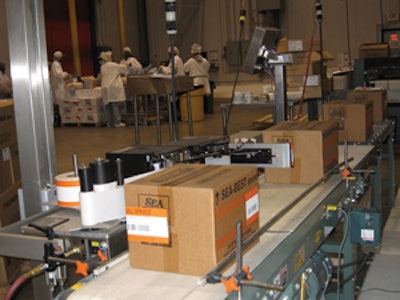
Additionally the BSF WMS/Order Pro-cessing system passes manufacturing product runs to Encode Inline, and the cases are encoded while traveling down the conveyer. All information is sent to the BSF WMS for inventory receiving and association. Beaver Street uses Rafsec Gen 2 RFID labels converted and provided by Donnick Label Systems Inc.
"Zebra's multi-protocol R110Xi Series printers were an excellent choice," says Stockdale, "because they are field-upgradeable with a free software download. With this capability, we knew our investment would be protected with no additional hardware required."
Phase Two: Gen 2 RFID Tagging
Beaver Street Fisheries managed a fast and smooth transition to Gen 2 RFID tagging. "It was really quite simple," Stockdale notes. "We downloaded Zebra's Gen 2 firmware, bought Gen 2 RFID labels, and were off and running, with no middleware or additional programming required."
Stockdale reports that the new standard has resulted in significant improvements to "good tag" yield rates—referring to the percentage of successfully encoded tags.
"In the early days of pilot testing Gen 1 equipment and labels, yield rates ran about 50 percent," he says. "As experience grew and improved hardware and software hit the market, Gen 1 label yield rates grew to the low 90 percent range. Today, with Gen 2 technology, our yield rates are in the high 90s, and often 100 percent."
In addition to better yield rates, Gen 2 RFID technology offers technical and performance improvements over Gen 1. These include faster and more accurate read rates, verification of encoded labels, more flexible label placement options, increased data capacity and increased data protection and security. The improvements are so significant, in fact, that major retailers and the U.S. Department of Defense are encouraging suppliers to transition to Gen 2.
At Beaver Street, the Gen 2 readers can accurately read an entire RFID tagged pallet of tagged cases on a forklift as they travel swiftly through a portal.
Beaver Street continues to look beyond compliance and has found additional ways to improve internal operations with RFID. According to Stockdale, "When a company is growing as fast as we are, there is not a lot of efficiency to be gained using manual methods. We began asking: How can we leverage RFID to achieve greater return on our investment?"
The obvious answer was automation —which, in this case, meant reengineering shipping lanes to accommodate inline printing and encoding of RFID labels, and applying the labels to cases as they are transported on the conveyor system.
To achieve this level of automation, the company contracted with Wavelength to install high-speed, high-performance Zebra R110PAX4 Print Engines in its inline operations. The original cart-mounted Zebra R110 Printer/Encoders are also still in use performing various other labeling applications within the plant.
On To The Next Phase
Beaver Street Fisheries is now in Phase Three of its RFID journey, exploring new ways to leverage the technology. For example, Stockdale and his team are looking at the potential for integration of RFID data with the company's existing warehouse and transportation management systems for improved product tracking and tracing throughout the supply chain.
Beaver Street has also begun looking at improving operations at remote supply sources. The company ran a test with its Nassau subsidiary to tag product shipped from the Bahamas to the Jacksonville facility. The plan is to use ZebraNet remote printer monitoring and control capabilities from Zebra Technologies to automatically generate smart labels at that site.
If this test is successful, this same method could be used with partners at other overseas packaging facilities so product could be labeled onsite, allowing Beaver Street to track all products received, inventoried, converted and shipped at the corporate facility via RFID.
Stockdale concludes: "In a few short years, we have gone from managing shipping with a clipboard to employing cutting-edge RFID technology. Given this, we believe its potential for improving our business is virtually limitless."